Included, switched on at your request
Ask your books from the AI app you already use.
Connect Claude, or another app that supports MCP, to your Nizamics account and ask in plain words: how much VAT is due, who is late paying, how much cash you will have over the next thirty days. The figures come from your own books, already calculated by them; the AI app puts them into words.
Off for every company until its owner asks us to switch it on. Your books stay stored in Jeddah; what the assistant reads is sent to your AI app’s provider, outside the Kingdom.
Already a customer? The company’s owner asks us, and chooses how far it may go. Then each person connects it from their own AI app.
How far it may go
- Level 0
Off
- Level 1
Answers
On the free plan, at your request.
- Level 2
Drafts
On Plus (SAR 115 a month with VAT, billed yearly).
- Level 3
Issues after you confirm
On Pro (SAR 287.50 a month with VAT, billed yearly).
What it will not do
It works inside your books. It does not run them.
It cannot delete or void anything, at any level. It cannot set up your books, add an account to the chart, connect a ZATCA device, lock a period, change who has access, or run the till: those stay in the dashboard. There is no "run any query" tool behind it, only a fixed set of questions and actions. It is not your accountant: the figures are your books’, but the sentences are the AI app’s, and an AI app can misread a question. Check a figure in the dashboard before you act on it.
Stays in the dashboard
- Deleting or voiding anything
- Setting up your books
- Adding an account to the chart
- Connecting a ZATCA device
- Locking a period
- Changing who has access
- Running the till
How far it may go
Four levels. The owner chooses one for each company.
The level is set by us, on the owner’s request, and each step up is written down with the reason. Whatever the level, the assistant never has more than the permissions of the person who connected it.
- Level 0
Off
The default for every company. Nothing can connect.
- Level 1
Answers
It reads and answers; it changes nothing.
On the free plan, at your request.
- Level 2
Drafts
It can also prepare things you can undo: a draft invoice, a new customer, a booking. A draft has no number, posts nothing and is not sent to ZATCA.
On Plus (SAR 115 a month with VAT, billed yearly).
- Level 3
Issues after you confirm
It can prepare a payment, a bill, a journal entry, a credit note or an invoice, show you exactly what it will do, and do it only after a person confirms.
On Pro (SAR 287.50 a month with VAT, billed yearly).
Level 1 · Answers
It reads and answers; it changes nothing.
- In the product
Find anything by name or number.
Invoices, credit and debit notes, bills, expenses, payments, entries, customers, suppliers and products.
- In the product
One document, in full.
Its lines, what has been paid against it, where it stands with ZATCA, and the entry it posted.
- In the product
Profit and loss, balance sheet, trial balance.
Rolled up by class or group; in Claude you can drill into an account on the page it draws.
- In the product
The VAT return, box by box.
Sales and purchases boxes with the net owed or refundable. It reads the return; filing it stays with you on ZATCA’s portal.
- In the product
Who owes you, and whom you owe.
By how overdue, biggest first.
- In the product
Cash and bank, and the next thirty days.
Balances per account, plus what is due in and out.
- In the product
Can these figures be trusted today?
Setup, ZATCA, work left undone, and whether the sub-ledgers still agree with their control accounts.
- In the product
A day’s appointments.
Who is booked, who is free, who is running late, for a branch or one person.
Level 2 · Drafts
It can also prepare things you can undo.
A draft has no number, posts nothing and is not sent to ZATCA.
Draft a sales invoice.
In the productWith your customer and products from the books, and a list of anything that would stop it being issued. You check it and issue it from the dashboard.
Add or edit customers, suppliers and products.
In the productIt looks for an existing entry first, so the same customer is not added twice. Nothing is deleted.
Say which invoices a payment settles.
In the productIt does not record a payment and does not touch the ledger.
Match bank statement lines.
In the productAnd undo a match.
Book, move or cancel an appointment.
In the productUnder the same rules as the front desk; when a time is taken it offers the free times instead. A cancellation cannot be undone, and the board shows the booking as made by the assistant.
Draft the invoice for a finished appointment.
In the productThe service at the booked price, with any deposit deducted. It never issues.
Level 3 · Issues after you confirm
Five actions that cannot be undone.
In the productRecord a payment received or made.
Record a supplier’s bill, with its VAT.
Post a journal entry.
Issue a credit note, filed with ZATCA.
Issue an invoice, filed with ZATCA.
The first time it is asked, it writes nothing: it shows you the amounts, the other party, the date and the accounts, and waits.
Only a person’s yes, given within five minutes and for exactly what was shown, lets it go ahead.
Change anything after the summary and you are asked again.
If the AI app cannot ask you through its own confirmation screen, credit notes and invoices are refused there, and you issue them from the dashboard. An issued invoice is corrected with a credit note, as ZATCA expects.
Examples
Ask it the way you would ask your accountant.
In Arabic or English.
- “How much VAT do we owe for last quarter?”
- “Which customers are more than 30 days late?”
- «كم الضريبة المستحقة علينا عن الربع الماضي؟»
- “Can we pay the rent on the 1st and still cover the suppliers due this month?”
- “How did September compare with August?”
- “Show me invoice 12 and where it stands with ZATCA.”
- «هل نقدر ندفع الإيجار أول الشهر ونغطي الموردين المستحقين هذا الشهر؟»
- “Who is free at 4 pm tomorrow?”
- “Draft next month’s retainer invoice for Bawabat Al-Sharq.”Drafts level
Control
You decide what it may touch. The books enforce it.
Off until the owner asks.
Every company starts with the assistant off. We switch it on only at the owner’s request and record the request.
Your permissions, never more.
It acts as the person who connected it. A cashier’s assistant sees what the cashier sees, in that branch only.
Checked on every question.
Your membership and the company’s level are checked again on every call, so removing someone or switching the company off takes effect at once, and connections are cut within fifteen minutes.
The last word is the database’s.
Posting to the ledger or issuing an invoice from an assistant is refused by the database itself unless the company is at the Issuing level and a person’s confirmation is attached.
Nothing is deleted.
No level can delete or void a record.
Every call is recorded.
Who asked, which action, when and how it ended, kept unchangeable and included in your company’s full download. The record holds no figures or names from your books. Changes the assistant made are marked in the books’ change history.
Names are treated as data.
A customer’s name or a bank line that reads like an instruction is passed to the AI app marked as data, not as an order. This lowers the risk; it does not remove it, which is one more reason anything irreversible waits for a person.
Your data
What stays in Jeddah, and what goes to your AI app.
Connecting an AI app is the one way your books leave the Kingdom, and it happens only if you choose it.
Stored in the Kingdom.
Your books, backups and signing keys are stored in Oracle Cloud’s Jeddah region, and the connector your AI app talks to (ai.nizamics.sa) runs on the same machine in Jeddah.
Requests reach us through Cloudflare’s network
What it reads is sent abroad.
Everything the assistant reads goes to the company behind your AI app, for example Anthropic for Claude or OpenAI for ChatGPT: figures, invoices and entries, and with them your customers’ and suppliers’ names, VAT numbers and addresses. That company processes it outside Saudi Arabia, under its own terms, not ours.
What is never sent. Your ZATCA signing keys, and your password: you sign in on nizamics.sa, and the AI app receives a key that lasts fifteen minutes at a time.
Check your AI app’s settings.
Whether your conversations may be used to train its models depends on your plan and settings with that company, not on us. Read them before you connect.
Your customers’ data is yours to answer for.
For their personal data you are the controller, so make sure you have a lawful basis for sending it abroad before you ask us to switch this on.
You see it before you agree.
The screen that authorises a connection says all of this, and Authorise stays disabled until you tick that you understand it. We keep a record of what you agreed to and when.
Take it back at any time.
Revoke it from Your account › Connected AI apps, or from the AI app itself; access ends within fifteen minutes. The owner can also ask us to switch the company off, which cuts every connection to it. Neither recalls what the AI company already received.
Requests reach us through Cloudflare’s network, which may carry them outside the Kingdom on the way. The privacy policy has the detail
Connecting
About five minutes, once it is switched on.
The owner asks us.
On WhatsApp or by email, with the level you want. We switch it on for the company.
Add the connector in your AI app.
In Claude: Customize › Connectors › Add custom connector, and paste https://ai.nizamics.sa/. Other apps that support remote MCP connectors have a similar setting.
https://ai.nizamics.sa/Sign in on nizamics.sa and read the screen.
It lists the companies the connection could act in and what leaves the Kingdom. Tick the box, then Authorise.
Ask.
Start with "Which companies can I work in?" if you belong to more than one.
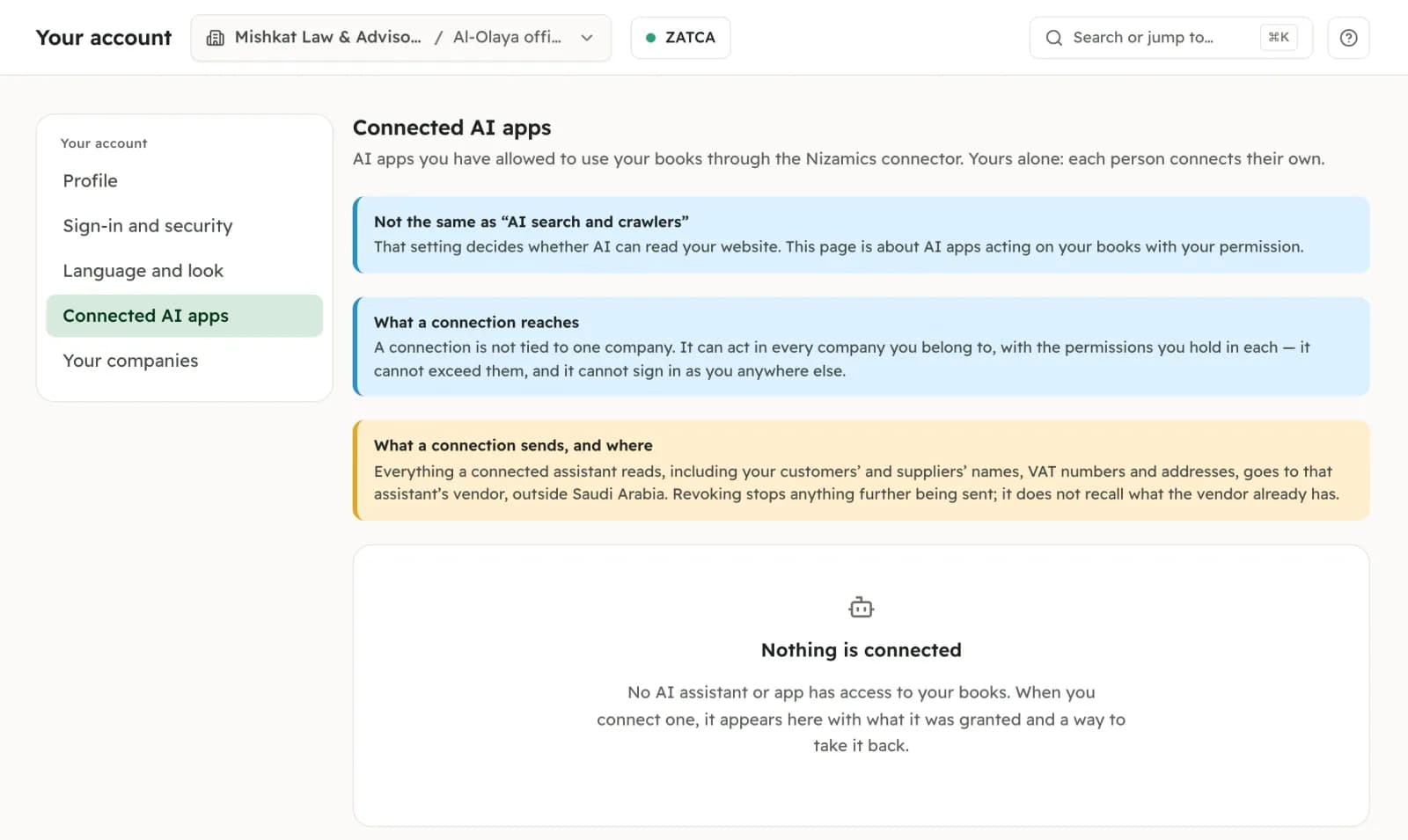 Demo company
Your account › Connected AI apps
Each person sees here what they have connected, and revokes it. On this demo nothing is connected yet, so it shows the empty state.
Questions
What owners and accountants ask.
- Which AI apps can I connect?
- Claude, on the web and the desktop app, is the one we use and test with; on its free plan you can add one custom connector. Any app that supports remote MCP connectors with sign-in can use the same address, https://ai.nizamics.sa/; ChatGPT, for example, offers it in developer mode on its paid plans. We have not tested every app, so tell us if one does not connect. The pages Claude draws beside an answer, such as the invoice preview, appear only in apps that support them; the answer itself always comes as text.
- What does it cost?
- On the free plan, at your request. On Plus it also drafts, and on Pro it issues after you confirm; the pricing page has both. Your AI app’s own subscription is between you and its provider.
- Can it post something wrong to my books?
- At the Answers level it changes nothing. At the Drafts level it can only prepare things you can undo: a draft invoice has no number, posts nothing and is not sent to ZATCA until someone issues it. At the Issuing level it shows you exactly what it is about to post or issue and waits for a person’s confirmation, and the database refuses the posting without one. It can still misunderstand what you asked, so read the summary before you say yes.
- Does my data leave the Kingdom?
- Yes, what the assistant reads does, once you connect one. Your books stay stored in Jeddah, but every figure, document and name the assistant reads is sent to the company behind your AI app and processed outside Saudi Arabia. Nothing is sent for a company until its owner has asked us to switch the assistant on and a member has connected an app.
- Will the AI company train on my books?
- That is decided by your plan and settings with that company, not by us. Some consumer plans use conversations for training unless you turn it off; business plans usually do not. Check the privacy settings of your AI app before you connect.
- Can my staff use it, and see everything?
- Each person connects from their own account, and their assistant has exactly their permissions: a branch cashier’s sees that branch, and only what a cashier may see. If someone leaves the company, their connection stops reaching it.
- How do I switch it off?
- Revoke the app in Your account › Connected AI apps, or remove it in the AI app; access ends within fifteen minutes. To stop it for the whole company, the owner asks us to switch the assistant off, which cuts every member’s connection. What the AI company already received is not recalled.
This page describes software, and each part is marked with where it really stands. It is not tax or legal advice, and an AI app’s answer is not an accountant’s. Read the terms of use and the privacy policy before you sign up.