Included, free
Stock that every sale, bill and count keeps right.
Each product’s quantity is kept per branch, and every change comes from a document: a sale, a supplier bill, a return, a count or a transfer. The entry that records a sale also posts what the goods cost, so your stock and your books never tell two different stories. It runs in the browser, on the same account as your invoices and your till.
Every stock feature is in the free plan, for 1,000 products in 1 branch. Plus and Pro raise the counts, not the features.
Bring your list from a spreadsheet or pick products from the library, then enter what is on the shelf as opening stock.
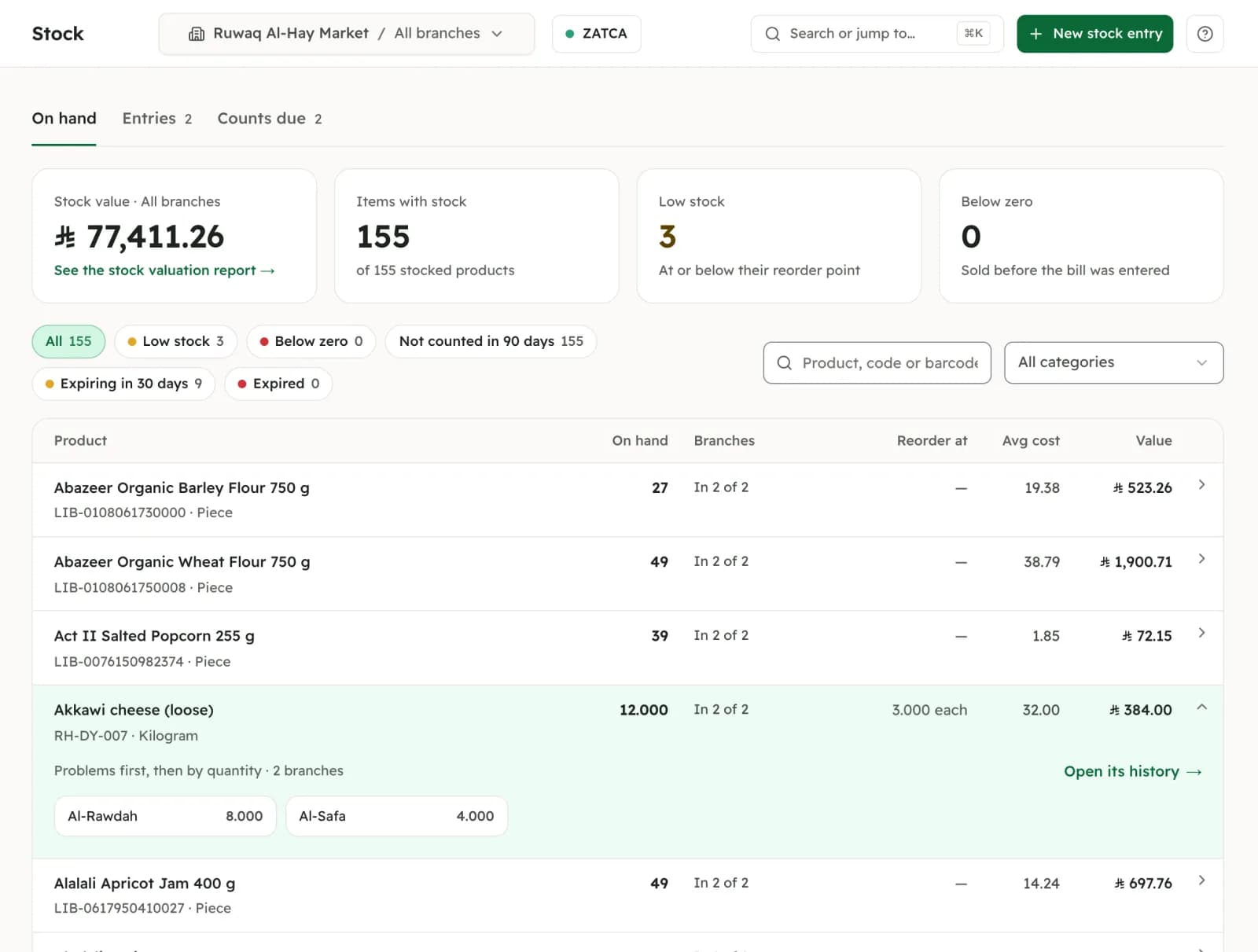 Demo company · 2 branches: Plus
What it does
Each part, with its real status.
In the product= live in the product today
- In the product
Quantities per branch, value per company.
Each branch has its own quantity. The value and the average cost belong to the company, so moving stock between branches changes no cost.
- In the product
Every movement has its document.
A product’s history lists every sale, purchase, return, count and transfer, with the document behind it. Nothing is typed in by hand, and a posted movement is never edited: another entry corrects it.
- In the product
Cost of goods with every sale.
Stock is valued at a moving average that each supplier bill updates. An invoice or a till sale posts its cost of goods inside its own entry, and the stock valuation report checks itself against the Inventory account.
- In the product
Buy by the carton, sell by the piece.
Stock is kept in one base unit; a carton, pallet or box is a pack with its own barcode and price. Ten cartons of 40 bring 400 pieces into stock.
- In the product
Batches and expiry dates.
An item tracked by batch records each batch number and expiry date as it comes in. A sale takes the first to expire and never one already expired, and an “Expiring soon” list shows what to move first.
- In the product
Serial numbers and IMEI.
Each piece is recorded by its serial, IMEI or chassis number. The invoice prints it with the warranty date, and a search finds any piece: where it is, who bought it and when its warranty ends.
- In the product
Weighed items, from the scale’s label.
Set it once to match your scale. Scanning the barcode label the scale prints puts the weight and the price on the line, at the till or on an invoice.
- In the product
Counts, adjustments, transfers and opening stock.
Type what is on the shelf and only the differences post. Record damaged, expired, lost or own-use stock, move stock between branches, and see what each branch has not counted in 90 days.
- In the product
Low stock, and below zero.
Give an item a reorder point and the low-stock list shows what to buy. A sale is never blocked: stock sold before its bill arrived waits on the “Below zero” list until a bill or a count puts it right.
Where this actually stands
What stock does not do yet.
Sizes and colours are not one product with variants: today each size or colour is its own product with its own barcode. Bundles and kits that take their contents out of stock are not built. There are no purchase orders or goods-received notes: stock comes in on the supplier bill. Cost is a moving average, with no FIFO cost layers (batches still leave first-to-expire). It does not print shelf barcode labels, run promotions or reorder by itself, and it does not work offline. We would rather you read that here than find it out after a count.
See it in the product
One stock ledger, however you sell.
Screens from demo companies we built to show the product. The names are made up; the screens are the real product.
By the kilo.
The scale’s label becomes a line with its weight and price.
Demo company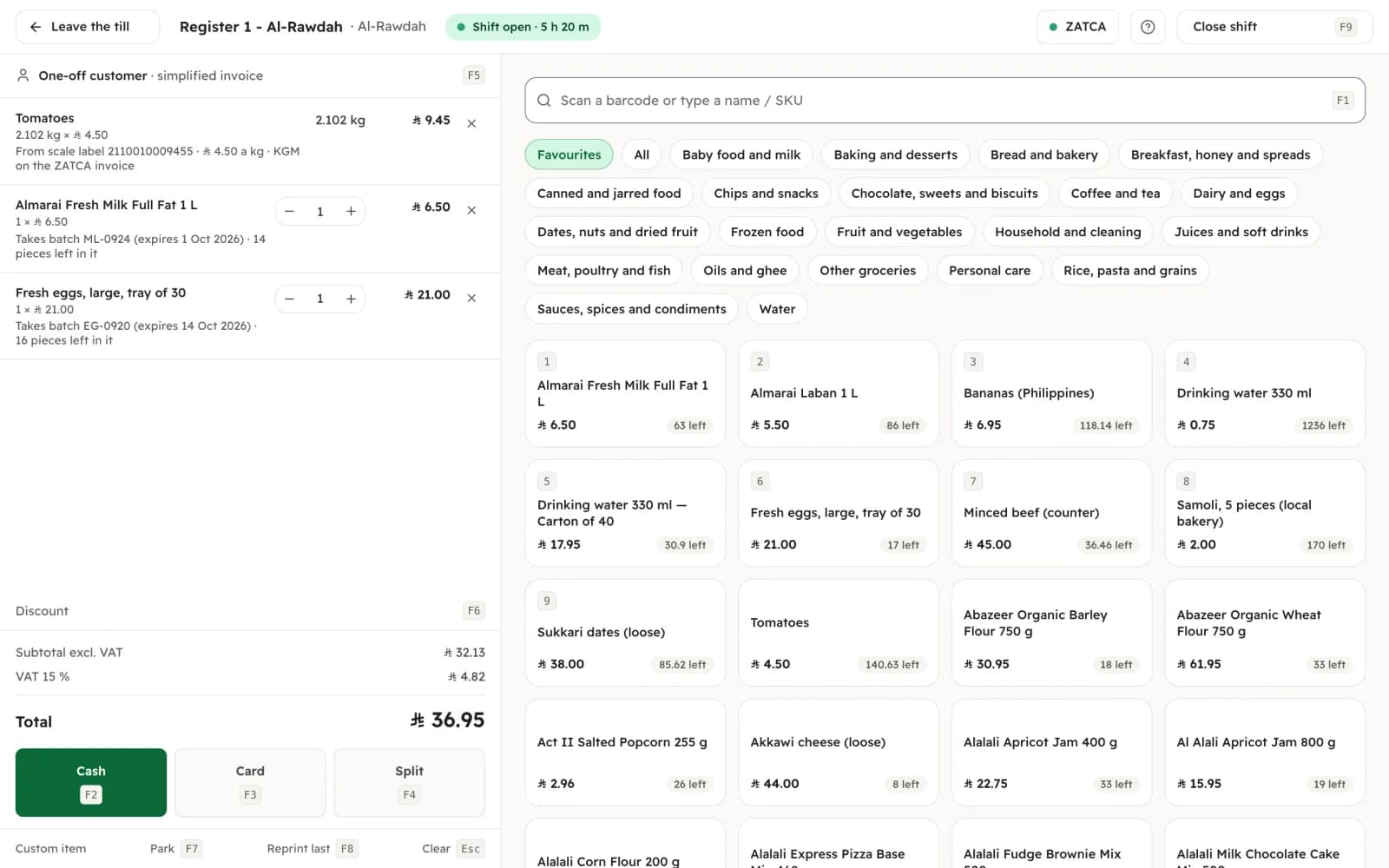
By the batch.
What expires first leaves first.
Demo company · 2 branches: Plus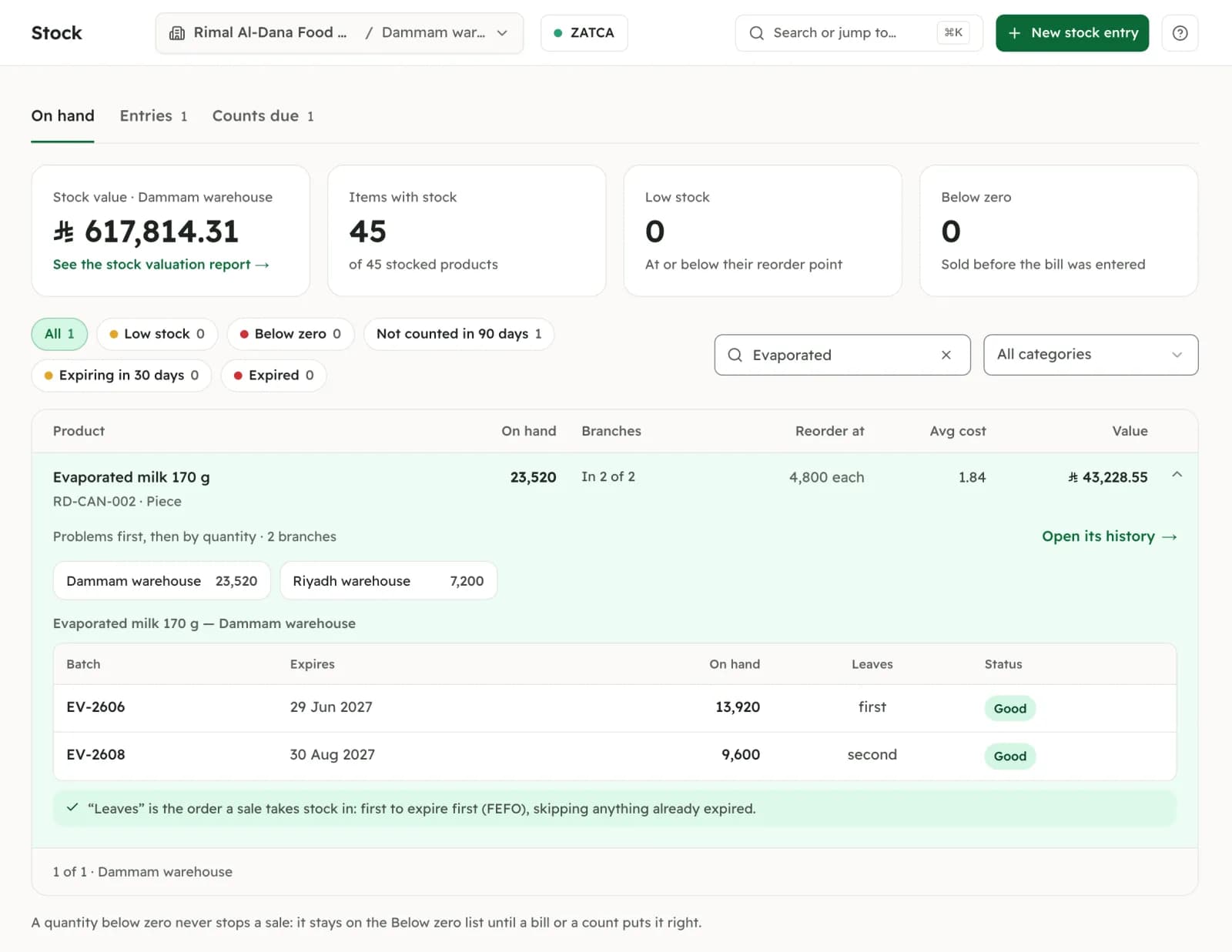
By the bag and the pallet.
One item, sold both ways, counted in bags.
Demo company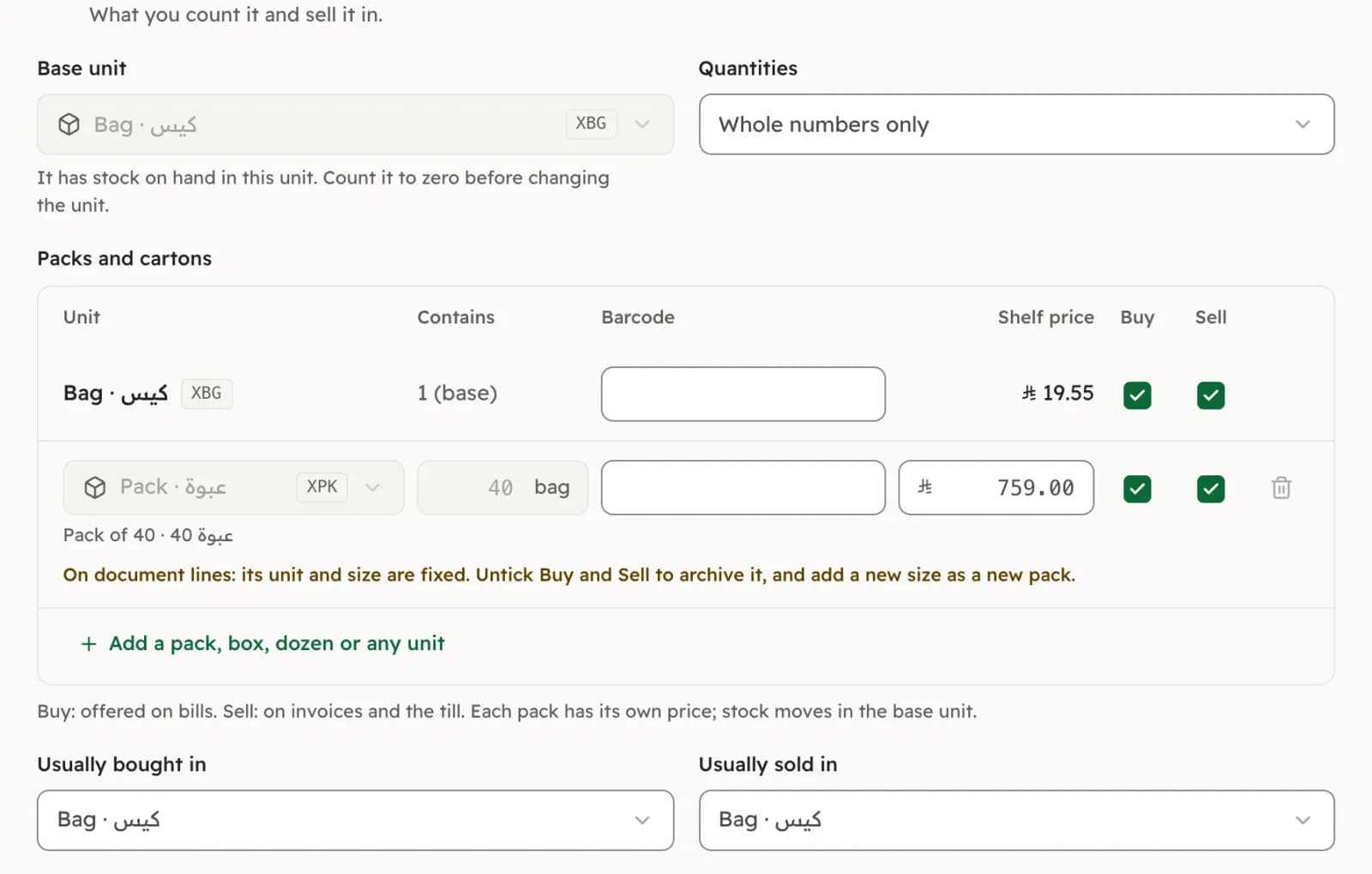
By the piece.
Every IMEI, where it is and until when it is under warranty.
Demo company · 2 branches: Plus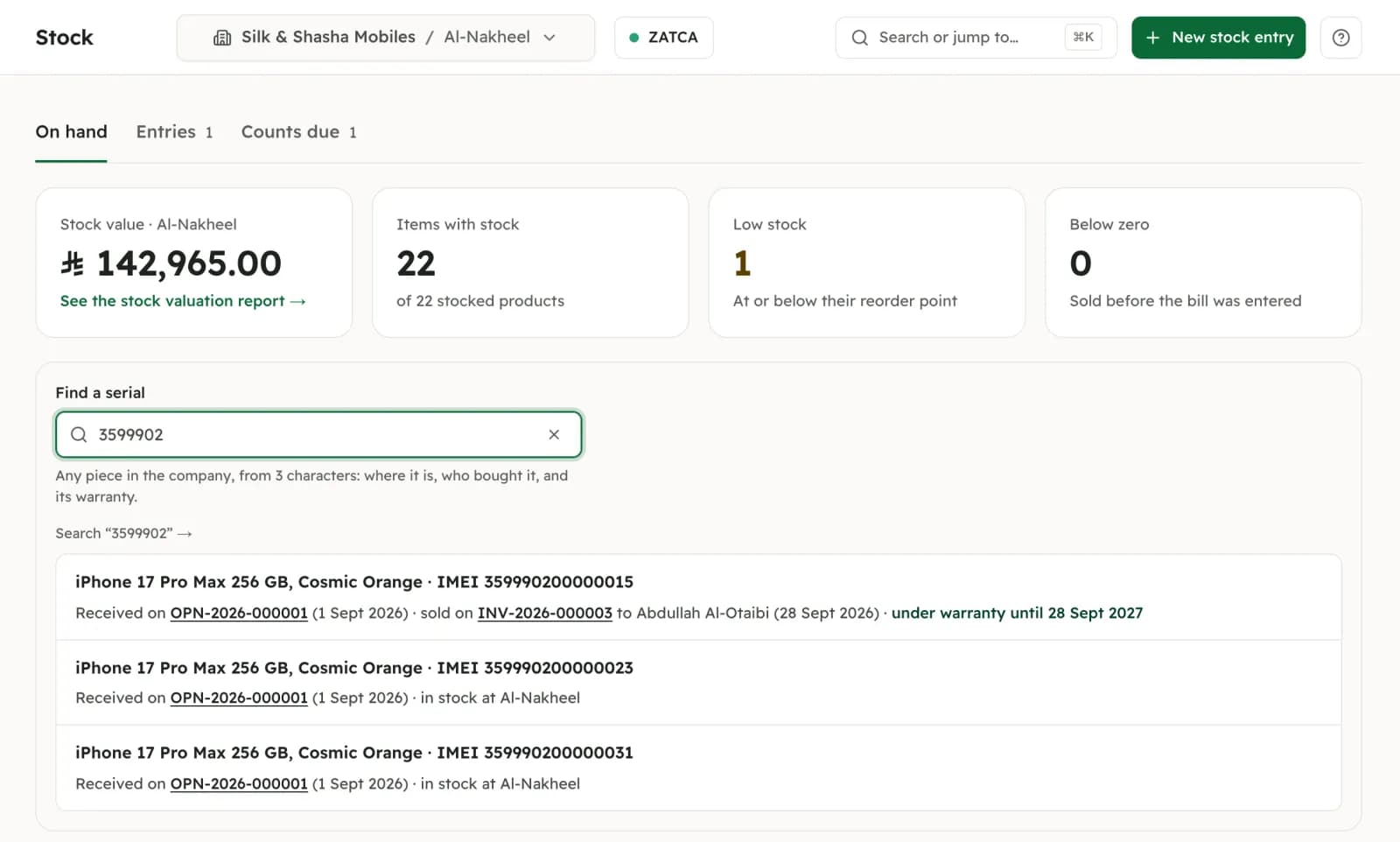
In your own units.
Quarter tola, half tola, tola: units the shop defines.
Demo company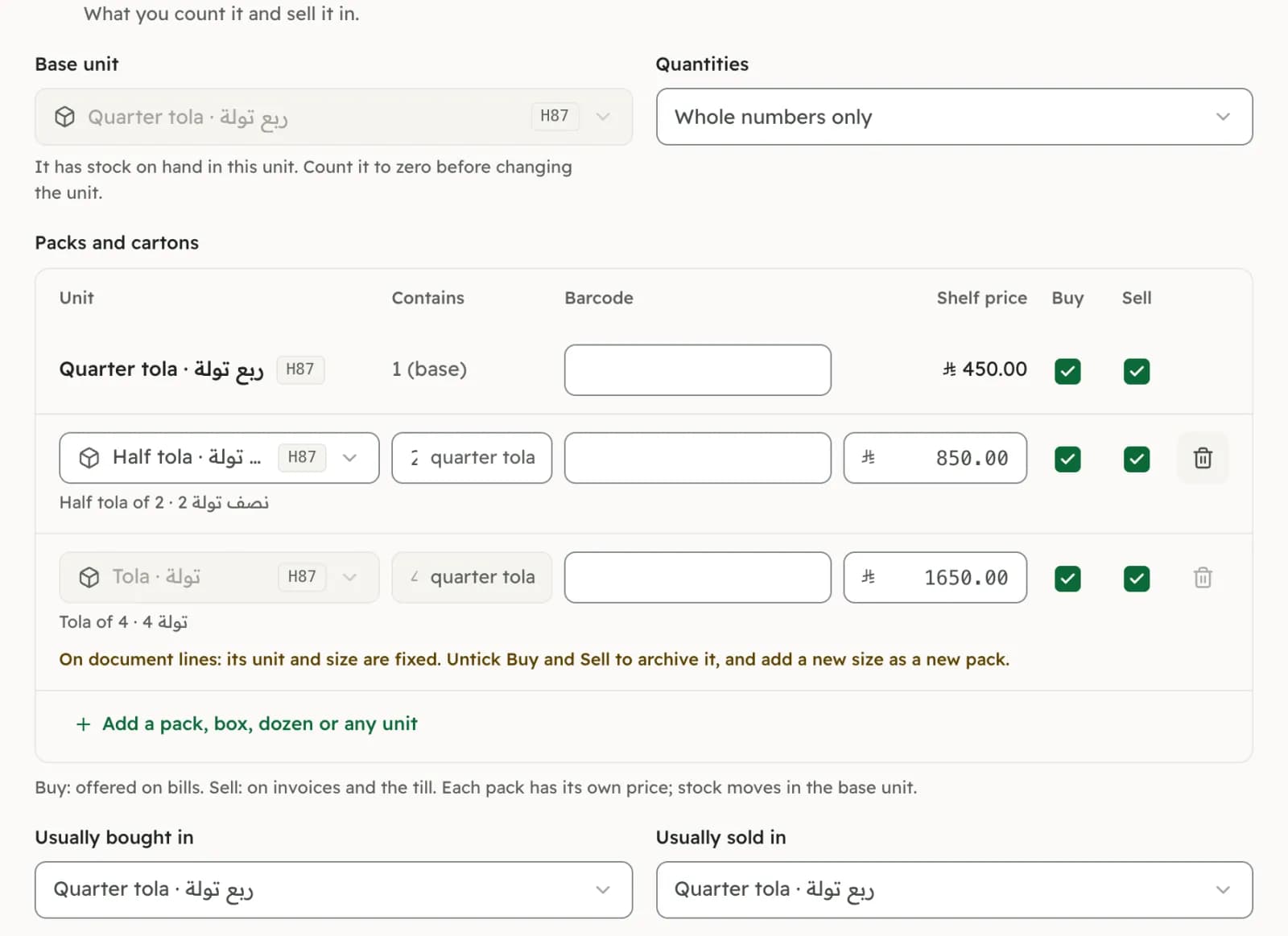
What it is worth, on any day.
By category, exported to CSV, matched to the ledger.
Demo company · 2 branches: Plus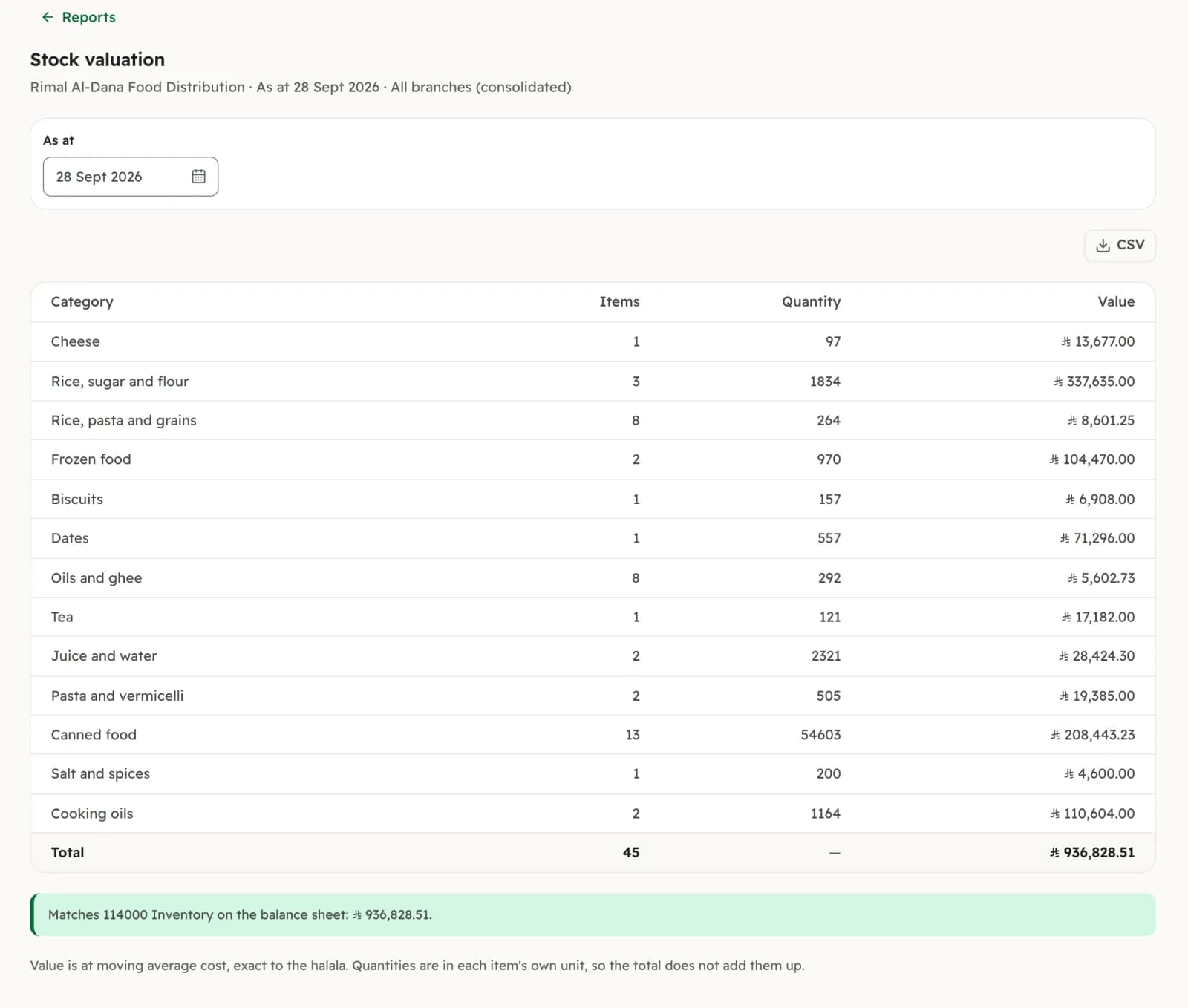
How to start
From a spreadsheet to a counted shelf.
Bring your products.
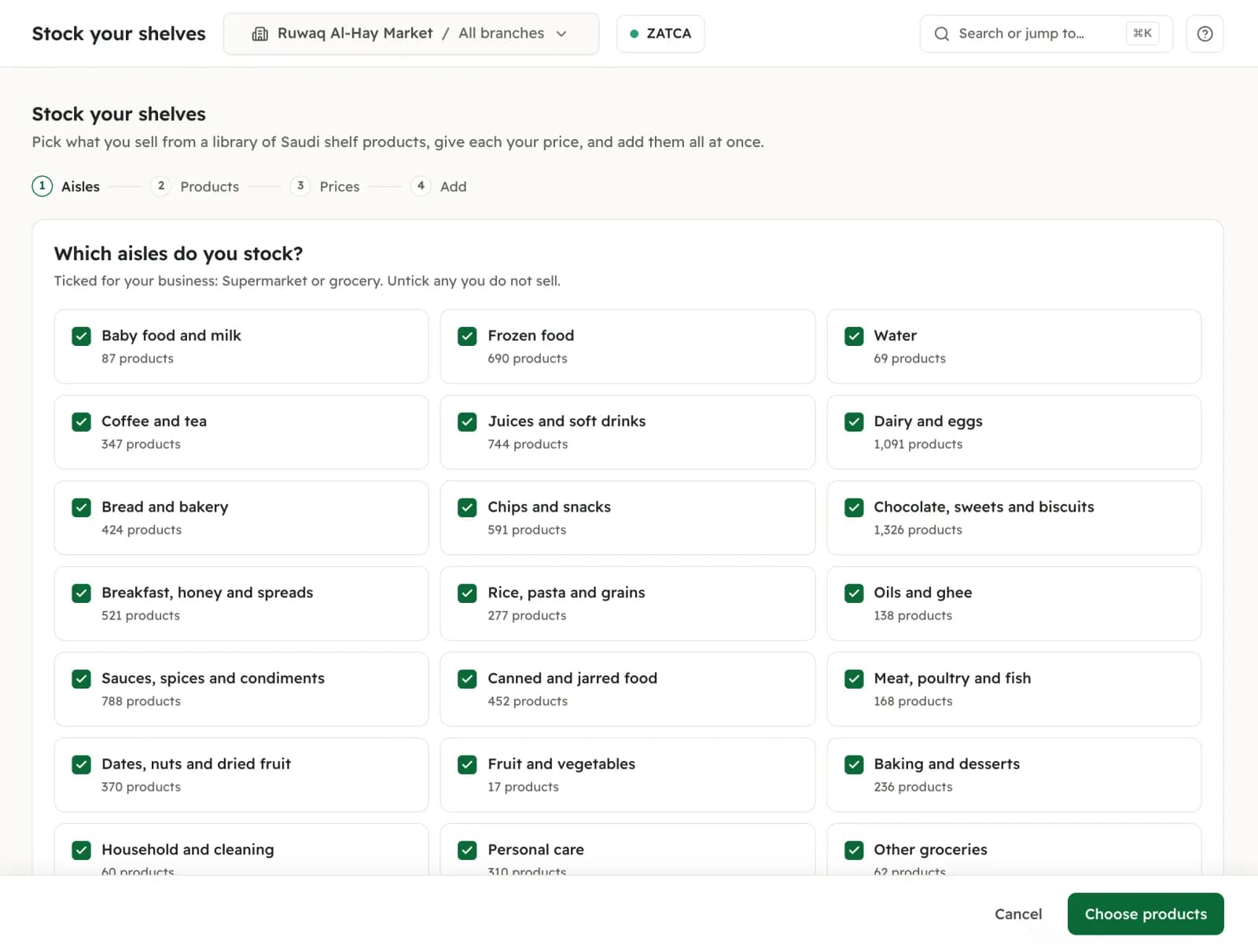
Upload a CSV or Excel file of up to 2,000 rows, with Arabic or English headers; nothing is saved until you confirm the preview. Or tick products aisle by aisle from the product library, or scan an unknown barcode at the till and add it there. The library fills in names, brand and unit, never a price.
Enter opening stock.
The owner records what is on the shelf in each branch and what one unit cost, scanning each product or adding a whole category at once. It posts to Inventory against opening balance equity.
Sell and buy as you do now.
Till sales, invoices, credit notes and supplier bills move the stock by themselves.
Count.
“Counts due” lists what each branch has not counted in 90 days. Count it, post it, and the difference goes to Stock adjustments.
 Demo company
Entered once
The same product, wherever you sell it.
At the till.
Each tile shows what is left: amber at the reorder point, red below zero. It never stops the sale.
On invoices and bills.
Lines take packs, batches and serials, and each stocked line says how many the branch has.
On your website.
Prices shown with VAT; an item that is out of stock cannot be ordered from your site, and search engines are told whether it is in stock.
In your reports.
Cost of goods is already in profit and loss, and the stock valuation is there for your accountant, by branch or for the whole company. Staff see quantities, never what stock cost.
Hardware
Works with what is on your counter. We sell no hardware.
Barcode scanner.
A scanner that types the code and presses Enter, as most USB and Bluetooth scanners do, works at the till and in every stock entry. There is no scanning with the phone’s camera.
Scale.
Nizamics reads the label your scale prints (a barcode starting with 20 to 29, an item number of 4 to 6 digits, and the price or the weight). It does not connect to the scale itself.
Receipt printer.
58 or 80 mm thermal receipts, sent from the browser. Barcode labels for your shelves are not printed from Nizamics.
Questions
What shop owners and traders ask.
Can I bring my product list from Excel?
Yes. Upload a CSV or an Excel (.xlsx) file of up to 2,000 rows, with Arabic or English headers; the columns of a common accounting app’s export are recognised on their own. You see a preview, and nothing is saved until you confirm. A second upload updates products that share the same SKU. Quantities do not come from the file: you enter them once as opening stock, by scanning or a whole category at a time.
Will it work with my barcode scanner and my scale?
A scanner that types the code and presses Enter works at the till and in stock entries. For weighed goods, Nizamics reads the barcode label your scale prints, with the price or the weight on it; you set the label’s format once in Settings and try a real label before the first sale. It does not connect to the scale, and we do not sell hardware.
How does it handle expiry dates?
Turn on batches for an item and each batch comes in with its number and expiry date. A sale takes the batch that expires first (or the one received first, if you choose) and skips anything already expired. “Expiring soon” lists what is close, 30 days ahead by default and adjustable per item, and “Write off expired” clears what is past its date.
I have several branches or a warehouse. Can I move stock between them?
Yes. Each branch has its own quantities, and a transfer moves stock from one to another without touching cost. The free plan has 1 branch; a second branch comes with Plus, or as an add-on, and the pricing page has both. There are no bin or shelf locations inside a branch.
Can one product have sizes and colours?
Not yet. Today each size or colour is its own product, with its own barcode and price, grouped under a category. Variants are designed and not yet built, so we do not give them a date.
How is my stock valued?
At a moving average, updated by every supplier bill and exact to the halala. Each sale posts its cost of goods in the same entry as the invoice, and the stock valuation report, on any day and by category, is checked against the Inventory account. FIFO cost layers are not offered.
What does stock cost?
Nothing. Every stock feature is in the free plan, for 1,000 products, counting products and services that are active; an archived one frees its place. Plus raises it to 10,000 products and Pro has no limit. Free for 1 branch, 3 users and 2 tills per branch, with up to 1,000 products. Unlimited invoices and customers.
This page describes software, and each part is marked with where it really stands. It is not accounting or tax advice. Product details in the library come from Open Food Facts contributors, under the ODbL. Read the terms of use and the privacy policy before you sign up.
Included, free
Every stock feature is in the free plan, for 1,000 products in 1 branch. Plus and Pro raise the counts, not the features.
Bring your list from a spreadsheet or pick products from the library, then enter what is on the shelf as opening stock.